

Systems
NetSuite Segregation of Duties Analysis
Your NetSuite roles may look fine one by one. What happens when one person holds several NetSuite roles?
One person might create a vendor through one role and approve payments through another. Neither role tells the full story alone. SOD Check looks at NetSuite users, roles, and permissions together. It shows where one person’s access could give them too much control over one process. Our software does the analysis. Experienced practitioners review the results before they are delivered to you.
SOD Check has been used by public and pre-IPO companies for 15+ years · No software to buy or implement · No direct access to your NetSuite · A service of A2Q2
A2Q2 has helped 30+ public companies strengthen controls, 17 before their IPO.
Watch the NetSuite demos and walkthroughs
See the videos below for what you receive.
Essential: get a snapshot
NetSuite Essential: product demo
See how the analysis works and what you get.
NetSuite Essential: walkthrough
See the files you receive and how to read them.
Pro: compare your results, see what changed
Premium: completeness, accuracy, evidence
NetSuite Premium: product demo
See how the analysis works and what you get.
NetSuite Premium: walkthrough
See the files you receive and how to read them.
What is a NetSuite segregation of duties analysis?
A NetSuite segregation of duties analysis checks whether one person can do two jobs that need a second set of eyes. An example is creating a vendor and paying that vendor. Your administrator sends two standard NetSuite reports. SOD Check finds the conflicts, ranks them High or Medium, and suggests fixes for management to weigh.
People also call this a NetSuite segregation of duties analysis or assessment. A review looks at who has what access. An analysis finds access that may conflict. An assessment is your management team deciding what that means. SOD Check is a technology-enabled segregation of duties diagnostic service from A2Q2 for finance and HR systems like NetSuite and Workday. Software analyzes your access data and experienced practitioners review the results. Your management team does the assessment.
A potential conflict does not prove that a transaction happened. It does not prove that a safeguard failed. It shows where to look.
Why do auditors ask about NetSuite access?
A financial statement audit is often when this becomes urgent. Your auditor may ask:
- Who can do what in NetSuite today?
- How do you know the NetSuite report data is complete and accurate?
- How did management review what was found, and what did it decide?
A role may look fine by itself. The risk shows up when one person’s roles add up to too much control over one transaction. Could someone:
- Create a vendor that should not exist, or change a real vendor’s bank details, and then pay it?
- Enter a journal entry and approve it too?
- Keep administrator access that is wider than the job needs?
NetSuite access also drifts. People join, leave, and change jobs. Roles get edited. Access that made sense last year may not fit today. The question is not whether a role sounds right. It is what a person can do with all of their permissions combined.
What will you receive?
You receive Excel workbooks. The Chain-of-Evidence Workbook shows the key results on one page and links each number to the NetSuite data behind it. The Detailed Diagnostic Workbook lists every potential conflict, ranked High or Medium, with recommended fixes. Some packages add comparisons, executive slides, and audit evidence.
- A current picture, fast. Results are guaranteed within 10 business days after we receive the required documents.
- Every number traced to its source. Your team can check the results and walk your auditor through them.
- Support for your auditor’s questions. Premium adds checks by our team on the NetSuite data behind the analysis, including its completeness and accuracy.
- A clear path for management. You get recommended fixes and the SOD Check Method to write down what management decided.
Have a deadline? Tell us when your auditor needs the results. We will tell you what it takes to meet it.
What does our NetSuite administrator need to do?
Your administrator runs two standard NetSuite reports. One shows which roles each user has. The other shows what each role can do. They save both as CSV or Excel files, add a screenshot of each, and upload them to a secure folder. We send step-by-step instructions. We never log in to NetSuite.
- Run the user-to-role report and the role-to-permission report.
- Save both as CSV or Excel files. Add a screenshot of each that shows when and where it was run.
- Upload the files to the secure shared folder.
Preparation time depends on how your NetSuite is set up. Before you upload, check that each export lists every user and role you expect. Two free guides show each click, with screenshots.
Your team stays in control. In a free 15-minute call, we confirm your NetSuite setup, the reports needed, your timing, and next steps for a fixed quote.
What does SOD Check look at in NetSuite?
Knowing each user’s roles is only part of the story. SOD Check looks at users, roles, and permissions together. This includes custom roles and OneWorld accounts with many subsidiaries.
A potential conflict can come from two places:
- Inside one role. One role has permissions that let the same person do two things that need a check. For example, create or change a vendor and also pay that vendor.
- Across roles. Each role looks fine alone. Together they give one person too much. SOD Check looks at everything a user can do across all of their roles.
Why it matters: a process may have no check, money may be lost or paid wrongly, or activity that affects the financial statements may go unchecked.
For each potential conflict, your results show:
- who is affected
- which roles and permissions add up to it
- what the access could allow
- whether it is High or Medium
How does the SOD Check Method apply to NetSuite?
Finding a potential conflict is where the review starts. It is not where it ends. SOD Check uses the SOD Check Method in five steps:
- Capture Data. Your administrator sends the two reports.
- Highlight Conflicts. We highlight where one person’s access could cover too much of one process.
- Examine Results. Experienced practitioners review each item and rank it High or Medium.
- Confirm Safeguards. Management checks which other controls may already cover the risk.
- Keep a Record of Decisions. Management writes down what it kept, removed, or added, and why.
You also get recommended fixes. Management decides what to change.
What if we use custom approval workflows?
A custom workflow may be an important safeguard. It does not necessarily remove the access that created the potential conflict. SOD Check highlights the combination at the role and permission level. Management then checks whether the workflow works as intended and whether it covers the risk.
For example, a user may be able to both prepare and approve a journal entry. Your company may also have a workflow that sends each entry to someone else for approval. That workflow may stop self-approval. It does not remove the access. It may be a control around what the access could otherwise allow.
Management then records the decision. It can keep the access because a control covers it, remove access that is not needed, change a workflow, or add a control. The Controller and process owners weigh the risk. Authorized system staff make the approved changes.
A potential conflict is a starting point. It is not an automatic instruction to remove access.
What if responsibilities go beyond NetSuite?
NetSuite is rarely the only system with financial access. SOD Check can review conflicts that cross systems, work done outside systems, or both. Each system needs its own completed SOD Check diagnostic first. The cross-system review is scoped separately. We set the systems and processes with you before work starts.
HR and payroll, purchasing, payments, and revenue tools can each hold part of one process. Workday, Rippling, ADP, Coupa, Zip, Tipalti, and Salesforce are examples.
For example, someone could change employee pay details in an HR system such as Workday, Rippling, or ADP. The same person could post payroll journal entries in NetSuite. Neither system shows the whole picture alone.
A NetSuite-only diagnostic does not cover other systems by default.
When should we run a NetSuite analysis?
Common reasons are an auditor request, a new NetSuite setup or module, role or permission changes, a reorganization, a known concern, or a regular check. Having a reason to check does not mean there is a problem.
See example reports
Five sample views from a NetSuite analysis. Click any view to enlarge it. The names and data are samples.
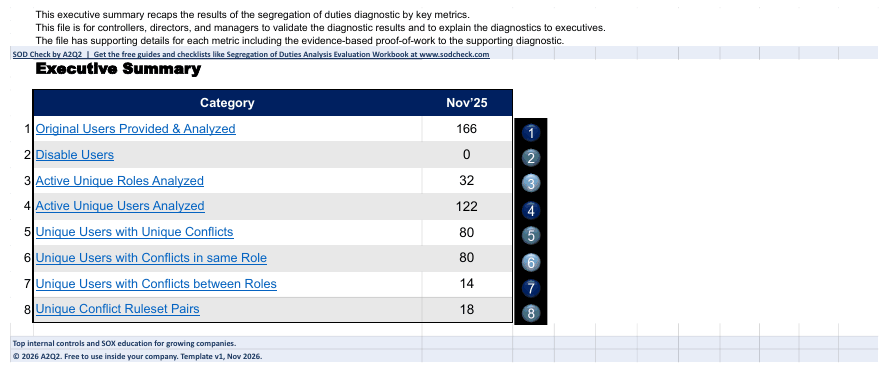
1. Executive summary.
One page that shows eight key counts, such as users analyzed and users with conflicts.
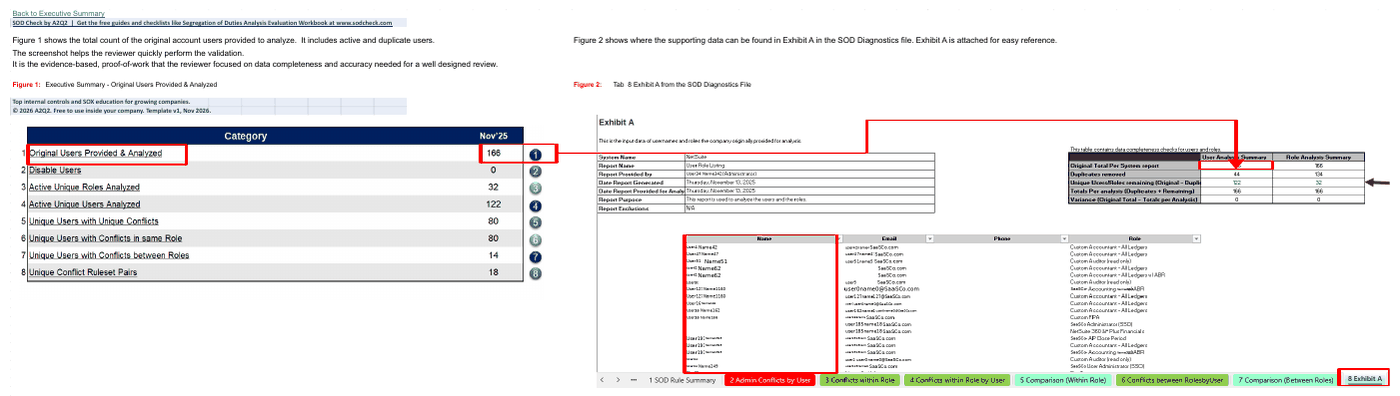
2. Chain of evidence.
Every number on the summary is traced to the data you provided.
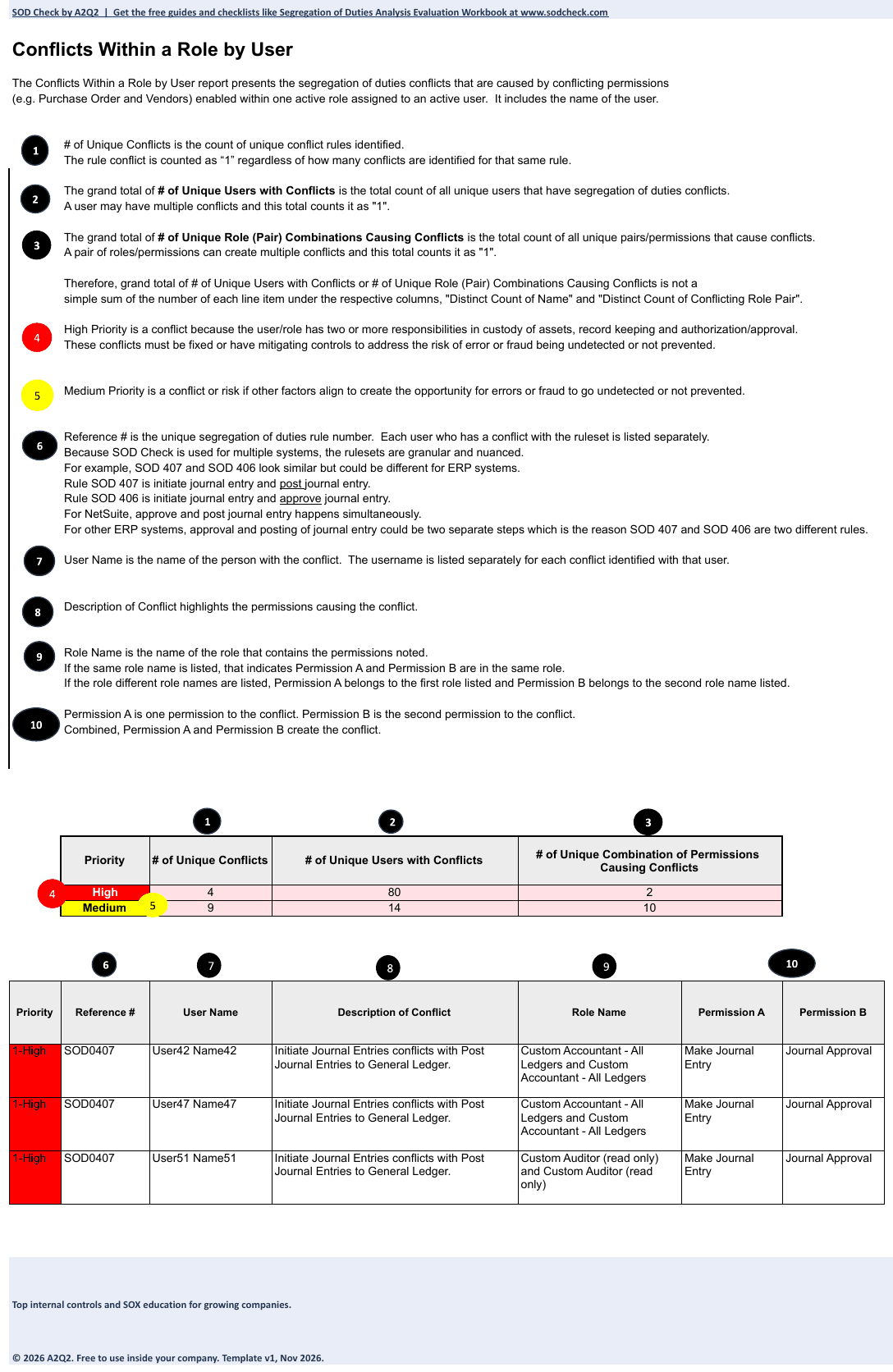
3. Conflicts within the same role.
Where one role carries conflicting permissions, listed by user and ranked High or Medium.
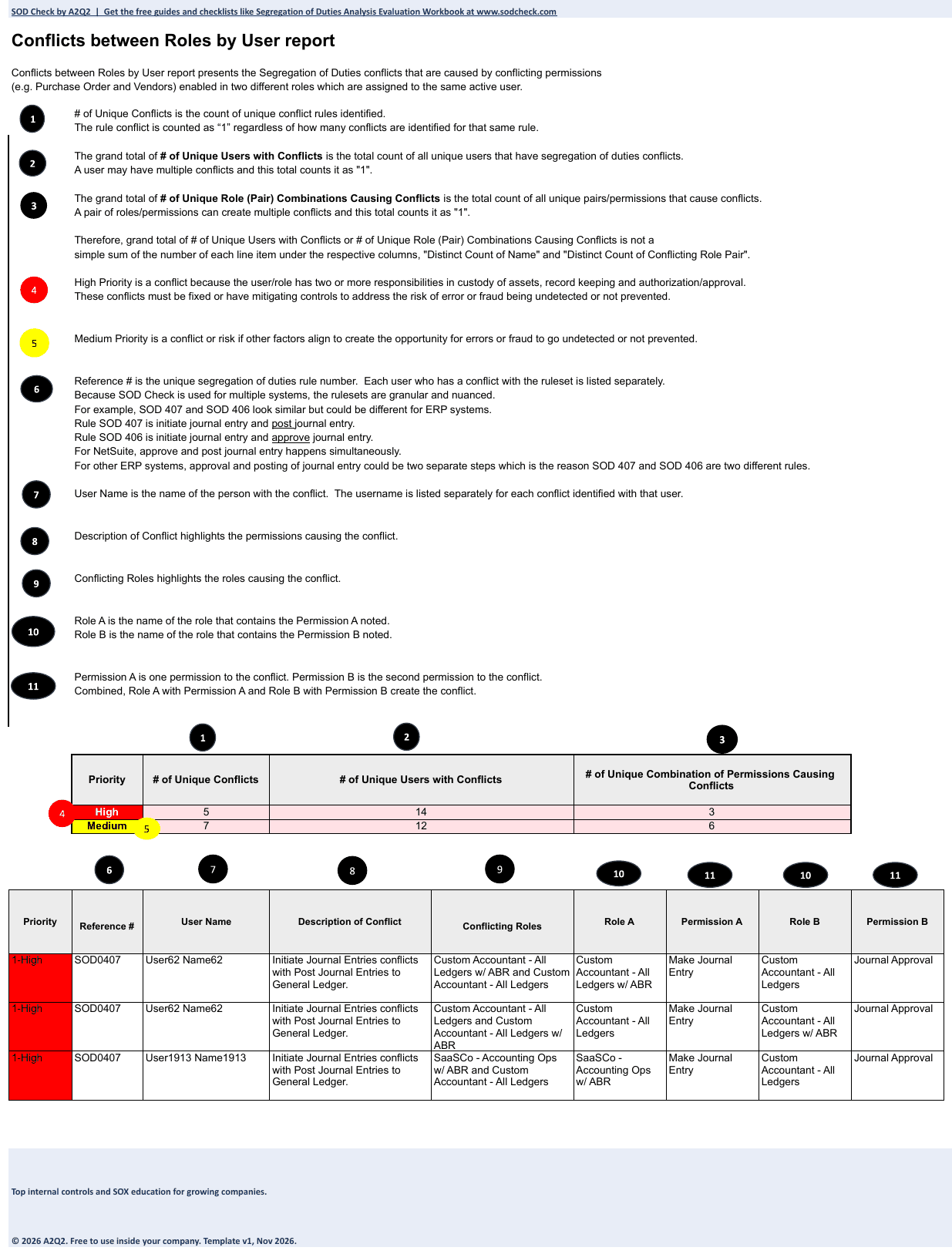
4. Conflicts between roles for the same user.
Where two roles held by one person combine into a potential conflict.
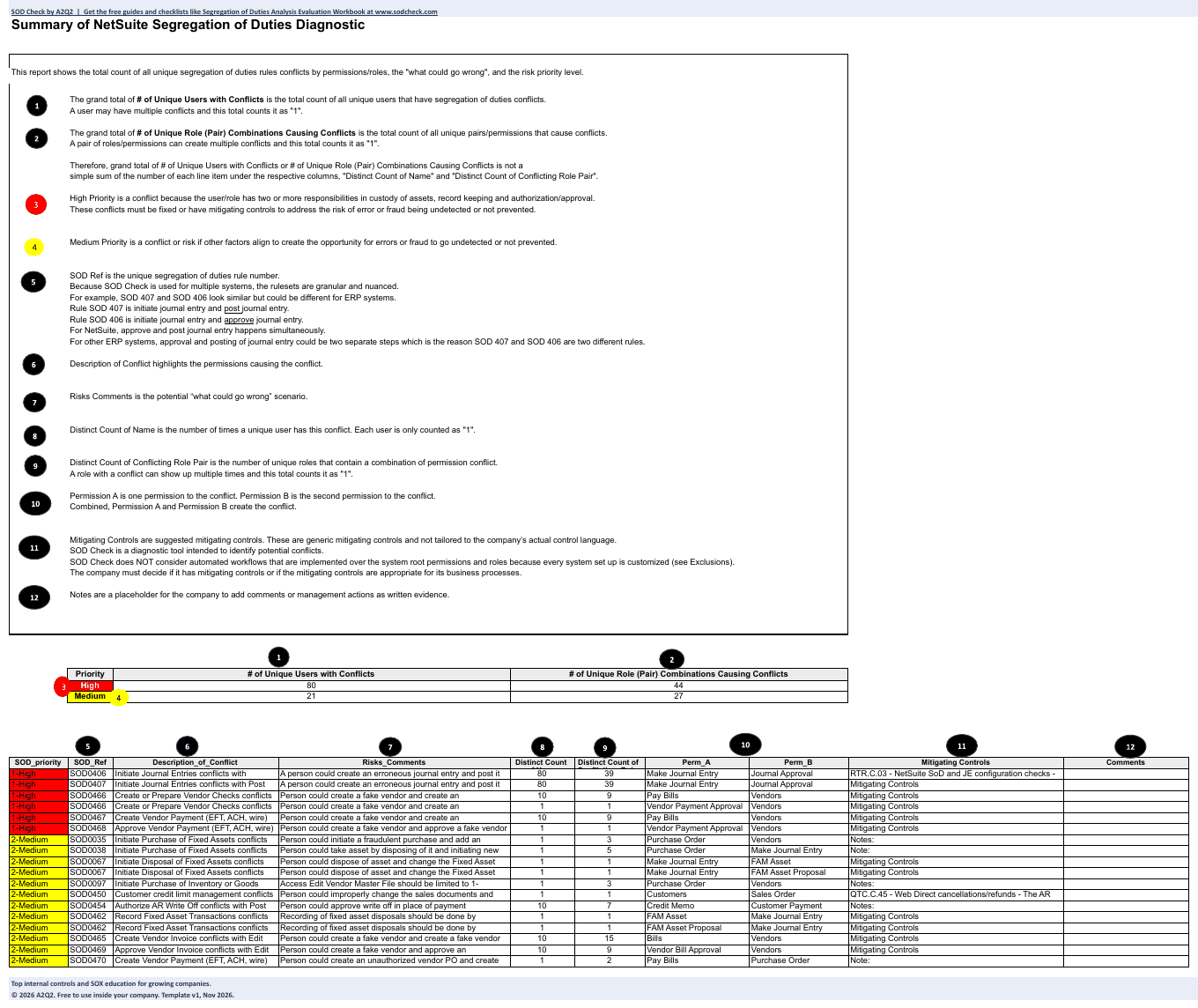
5. Rule summary.
Each rule, what could go wrong, and suggested mitigating controls.
Want to do the NetSuite segregation of duties analysis yourself?
Here are free workbooks you can fill in for yourself.
- NetSuite Essential, Chain-of-Evidence Workbook
- NetSuite Pro, Chain-of-Evidence Workbook
- NetSuite Premium, Chain-of-Evidence Workbook
- NetSuite Essential, Detailed Diagnostic Workbook
- NetSuite Pro, Detailed Diagnostic Workbook
- NetSuite Premium, Detailed Diagnostic Workbook
Which package should we choose?
Each package is a fixed price per system, per run. Choose by the question your team needs answered. We share pricing once we understand your scope.
We are so confident in the results you receive that you get three guarantees
If you are not satisfied with your SOD Check, you get your money back.
If you find a potential access conflict we missed, that run is free.
Results within 10 business days after we receive the required documents.
See what each package includes on the Products page.
Need it sooner? Expedited 5-business-day delivery is available for an additional fee, subject to capacity.
Who can do a NetSuite segregation of duties analysis: our own team, software or a service?
Four kinds of provider can do a NetSuite segregation of duties analysis: your own team, a consultant, software your company licenses and runs, or a diagnostic service such as SOD Check. With SOD Check, your administrator sends two standard NetSuite reports. Our software analyzes them. Experienced practitioners review the results. Your management team assesses them and decides what to change.
You can run a NetSuite analysis on your own. You would build and maintain the data needs, the segregation of duties rules, the cross-role analysis, the ranking, and the evidence. SOD Check gives you a result reviewed by practitioners when you need it. There is nothing to install. Software can fit a company that wants to run continuous monitoring itself. Compare scope, how often you need results, who does the work, and cost.
Who is behind SOD Check?
Top internal controls and SOX education for growing companies. SOD Check is a service of A2Q2, a SOX and internal controls firm. A2Q2 has helped 30+ public companies strengthen controls, 17 before their IPO.
Kim Le, top internal controls and SOX educator | Former public company audit committee chair | Helped 40+ public companies strengthen controls, 19 before their IPO.
Kim Le designed SOD Check. She is a CPA and CIA with more than 30 years of public accounting experience serving public and private companies.
SOD Check has been field-tested and used for more than 15 years. It has run as a methodical, systematic diagnostic since 2011. Big Four audit teams have reviewed its output during company financial statement audits. Experienced practitioners review every diagnostic.
After its first SOD Check, one NetSuite customer redesigned its roles and cut its conflicting rule pairs by 80% in four months. That was the customer’s own result after it acted. It is not a promised outcome.
NetSuite questions
Do you need access to our NetSuite? No. Your administrator runs the reports and uploads them to a secure shared folder. We never log in to NetSuite.
What NetSuite information do we provide? Two standard reports, saved as CSV or Excel, with a screenshot of each. Two free guides have the exact steps.
What if the conflict is inside one role? SOD Check checks permissions inside each role and across all roles one user has. It finds conflicts even when both permissions sit in one role.
What if a workflow prevents self-approval? Management should treat it as a possible safeguard. It does not necessarily remove the access underneath.
Does it work with custom roles? Yes. Every role is checked permission by permission, including roles your team made or changed. We confirm during scoping which access levels the rules cover.
Does it work with NetSuite OneWorld? Yes. It supports OneWorld accounts with many subsidiaries.
Does every High rating mean we must remove access? No. Management looks at the context and the safeguards, then decides.
Can this help us answer our auditor? Yes. It gives you analysis and supporting evidence. Your external auditor decides if the evidence is enough.
Our auditor already raised a NetSuite segregation of duties issue. Can you help? Yes. SOD Check shows where the conflicts are, ranks them, and recommends fixes for management to weigh. Run it again after you change roles or permissions to see what improved.
Does SOD Check make the fixes? No. No automatic fixes are included. Any broader help needs a scope we agree on in writing.
Is this the same as a user access review? No. Segregation of duties looks at conflicting responsibilities or access. A user access review asks whether access is right for the job more broadly.
Can we run it again after role changes? Yes. A later run shows what changed. The result may be better, the same, or worse.
Does SOD Check give a guarantee? Yes. Results are guaranteed within 10 business days after we receive the required documents. If you are not satisfied with your SOD Check, you get your money back. If you find a conflict our diagnostic missed, that run is free.
Know what your NetSuite roles allow, before the next audit discussion
Each of your NetSuite roles may look fine on its own. SOD Check shows what they allow together, and where a potential conflict deserves a look. Start with the free Evaluation Checklist. If your auditor is waiting, tell us your deadline.
Know what people can do. Understand what could go wrong. Focus on what matters. No software to install. No direct access to NetSuite. Your team stays in control.
SOD Check is a service of A2Q2.