
Systems
Cross-System Segregation of Duties Analysis
Can one person have conflicting access across NetSuite and Workday?
SOD Check is a technology-enabled segregation of duties diagnostic service from A2Q2 for finance and HR systems like NetSuite and Workday. Software analyzes your access data and experienced practitioners review the results. It can analyze the same person’s access across NetSuite and Workday. Our cross-system diagnostic brings the system results together to identify potential conflicts. Management assesses the risk, considers safeguards, and decides what to do. A cross-system analysis does not replace a full user access review or prove that a control failed.
Each system in scope needs its own SOD Check diagnostic first. The cross-system work has a separate scope.
Watch the cross-system demo and walkthrough
Two short videos. The product demo shows how a cross-system analysis works. The walkthrough shows the files you receive.
Cross-system analysis: product demo
See how one analysis covers the same person across systems.
Cross-system analysis: walkthrough
Walk through the three files you receive and how to read them.
Which level of analysis do you need?
One-System Analysis
A one-system diagnostic looks at users, roles, permissions, and potential conflicts in one supported system.
For example, a NetSuite analysis can show access that may conflict within NetSuite.
Choose this when the duties you need to analyze sit in one system.
Cross-System Analysis
A cross-system diagnostic brings the results from each completed system diagnostic together. It looks for conflicts you may miss when you analyze each system alone. The exact data and deliverables are set in the agreed scope.
For example, a Controller may need to know what one person’s access in Workday and NetSuite could allow them to do.
Each system in scope needs its own completed SOD Check diagnostic first. The cross-system analysis is scoped separately.
Integrated Analysis
Some duties sit outside a system. For example, a person may approve a payment by email or sign a paper check.
An integrated diagnostic looks at system access and those off-system duties together. It can cover one system or more. First, complete the diagnostic for each system in scope and a manual-process diagnostic of the off-system duties.
Management checks the safeguards and decides whether to act.
Why does combined access matter?
A Workday analysis may show one part of an employee’s duties.
A NetSuite analysis may show another.
The Controller needs to know whether those duties, when held by one person, create a risk worth a closer look.
A cross-system analysis helps the team answer that question.
It does not prove that a wrong payment was made or a control failed. It does not mean an auditor will accept the results.
How should management assess duties across both systems?
Example: a person can maintain employee pay information in Workday and also record payroll-related journal entries in NetSuite. Management would check whether the actual access and process permit incompatible steps, whether another person approves changes or reconciles payroll, and whether those safeguards work. Holding both responsibilities does not by itself establish a conflict.
Management may change access, add a check, look into the issue, or record why the current setup is right for the job.
How does analysis lead to action?
A useful analysis does more than list access that may conflict.
It helps management work through a decision:
Collect access → Analyze potential conflicts → Assess risk and safeguards → Decide next steps → Document decisions
A potential conflict does not prove fraud, a loss, or a failed control.
Controllers and process owners decide what to do about the risk. System owners approve system changes. Authorized IT and system staff make those changes.
See sample results
More than one system
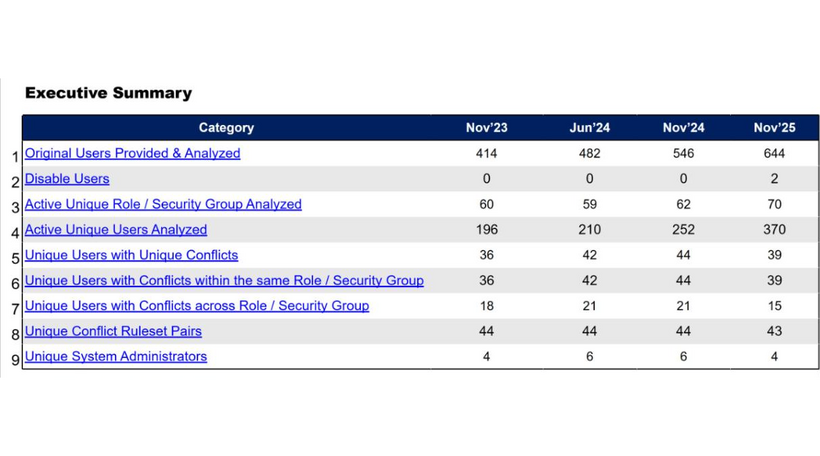
Completed cross-system results workbooks
When duties are split across two systems, the conflict only shows up when you look at both together. These examples map roles and security groups side by side and add a count of system administrators.
Want to do the Cross-System segregation of duties analysis yourself?
The blank workbooks and worksheets all live in one place. Get the free guides and worksheets.
Which type of analysis do you need?
| Your situation | Scope to discuss |
|---|---|
| One system | Consider an analysis of that system. |
| Two or more systems | Consider cross-system analysis once each system’s diagnostic is complete. |
| Systems plus off-system duties | Discuss an integrated diagnostic and the work needed first. |
| Not sure | Start with the systems, process, and duties that concern you. A2Q2 can help you work out the scope. |
See the NetSuite analysis and Workday analysis pages for system-specific preparation.
We are so confident in the results you receive that you get three guarantees.
Guarantee 1
Not satisfied? Your money back.
If you are not satisfied with your SOD Check, you get your money back.
Guarantee 2
Missed a conflict? That run is free.
If you find a potential access conflict we missed, that run is free.
Guarantee 3
Fast. Results in 10 business days.
Counted from the day we receive the required documents.
More answers are on the FAQ.